
Bypass Windows Desktop App Authentication via mitm_relay
Hope you (the readers) are doing well.
This blog post is about traffic interception and modification. In brief, what I am basically doing is being the man-in-the-middle or what they call it adversary-in-the-middle nowadays. So the target application will be another thick client that authenticate its user via ldap. Like the other blog post where we talked about the same thing but the approach here is significantly different. The circumstances are slightly different as well.
Let’s list down the findings from my reconnaissance on this target.
- Found out via Wireshark that the app uses LDAP to authenticate its users but using a non secure channel on port 389.
- This also means all the traffic are transmitted in clear text.
- The LDAP server is only reachable via internal network.
- The app does not verify/validate the server it’s communicating with.
The Plan
Based on these findings, we can craft our exploit to something like this. The target app connect to a proxy that I will be in control of and then my proxy will redirect the modified packet to the original server that the app is communicating with and vice versa - in short my proxy is the MITM.
Then its just a matter of modifying the return packet to the client so that it reads the value as success eventhough the response we got from the server is a failed one. In this case, if user authenticates with a bogus credentials, and we forward it to the server, the server will reply with an invalid credentials response code in ldap format to our proxy. All we need to do is to change the byte that represents this invalid credentials value to a success value.
Challenge
The main challenge of this exploitation is to capture a non-http traffic and also to understand ldap response code formatting and values since we want to use the success value and forward it to our target app.
To overcome the first challenge, I stumbled upon two extensions in burp that we can use to capture non-http traffic.
I preferred the NoPE extension initially but sadly it does not work on my PC for unknown reasons which forced me to use the second extension. This mitm_relay is not an extension exactly but a tool that uses Burpsuite to do its thing. The diagram below shows precisely how it works.
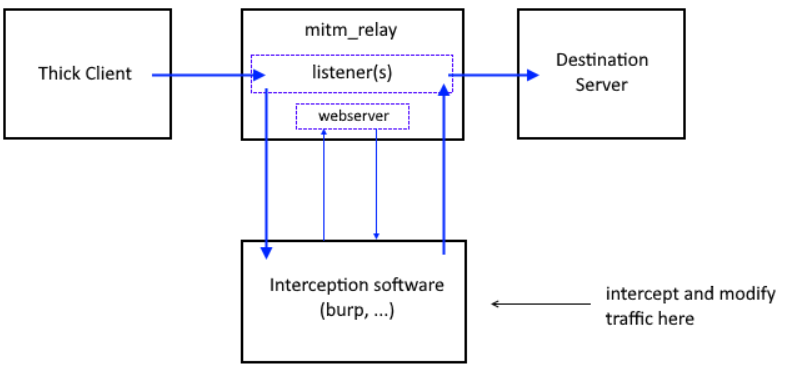
You can understand more by reading the tool’s Github page.
To operate this tool, user must set the listener, proxy, and destination IP addresses. The listener IP is where the mitm_relay will run, often set to the localhost (127.0.0.1) for convenience. The proxy IP should match the address configured in your proxy application, such as Burp Suite, which is used to intercept and modify the thick client’s traffic. Finally, the destination IP address must be provided, which is typically the server the thick client communicates with..
In short, the tool requires three key settings:
- Listener IP (where mitm_relay runs, usually localhost 127.0.0.1)
- Proxy IP (Burpsuite address for traffic interception)
- Destination IP (the LDAP server address that the client communicates with initially)
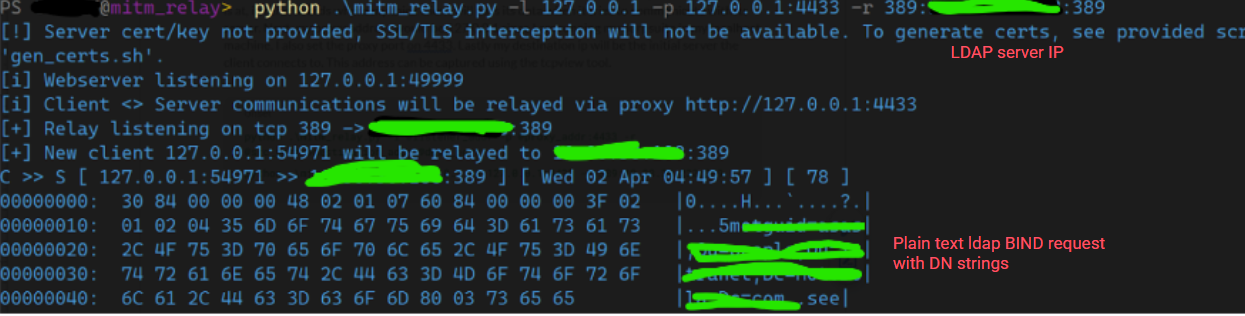
Apologize for the ugly attempt of masking data but you can see that mitm_relay manage to capture ldap traffic successfully. Since the connection is not encrypted we can see the plain text BIND request for authentication.
Main Goal
Our initial goal is to bypass the authentication on this app. Just by looking at plain text data won’t be able to let us do that. We have just compromise the Confidentiality part, the next one would be the Integrity part. To do that we need to understand LDAP response code. I don’t have the snapshot with me but this is how response message from LDAP server is structured. You can get more details here. We can see that invalid credentials result message value is 49 which is in decimal and needs to be converted to hex. The hex value is 31 and it is align with our resulting message.

All we need to do now is go to Burpsuite and capture the response once again. You should see the SERVER_RESPONSE captured. The image below is just an example.
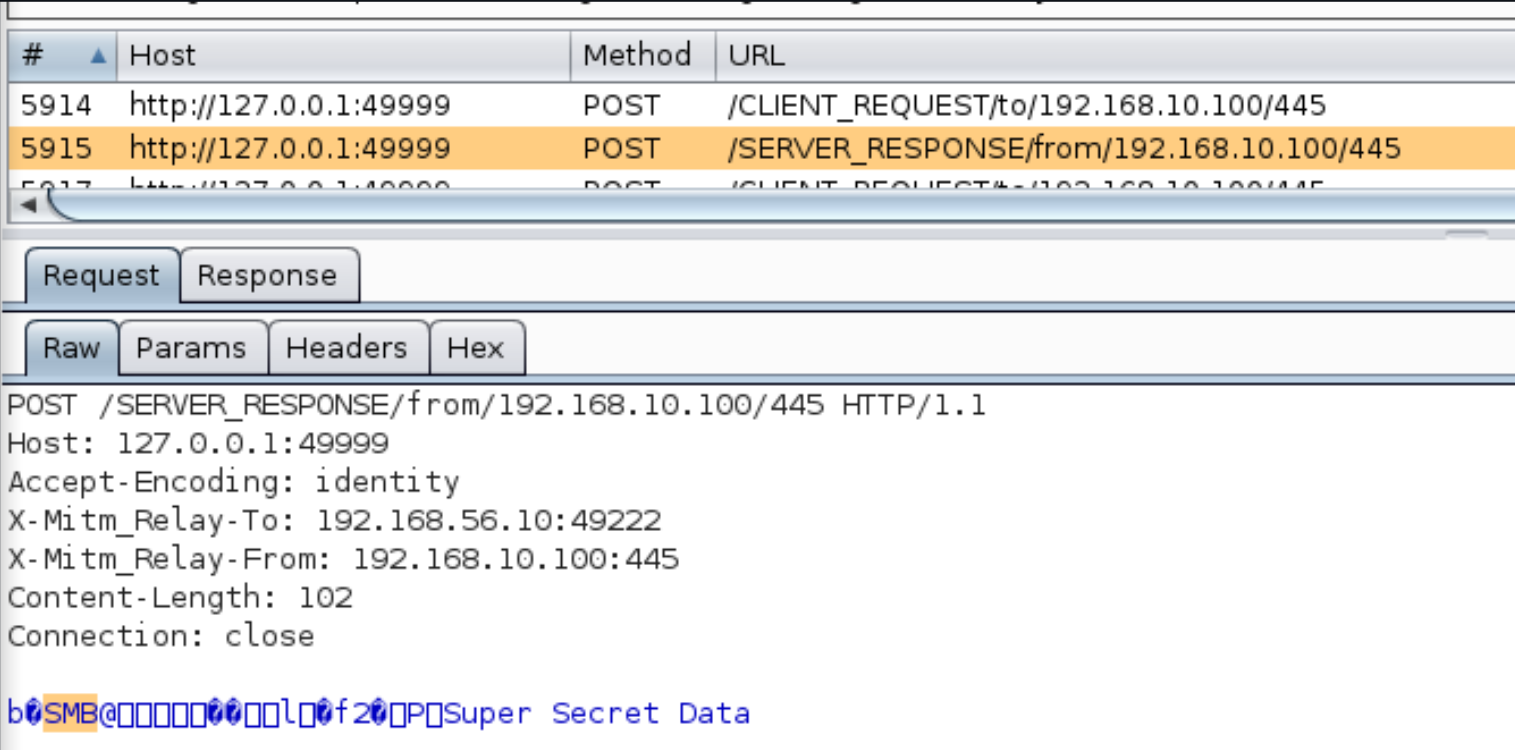
Before forward it back to the app, we modify the value highlighted to 00 which signify Success. What left is to just enjoy the successful bypass of the authentication without having to create fake users or setting up fake servers. It’s a fun experience.
Conclusion
As usual, let’s discuss about the risk level of this finding. For the first timer, I would rate this setup as “Hard” since we need to understand the flow of the packets over many hops and at the same time to learn about the LDAP response message structure which is time consuming. However, given that we see the communication is not encrypted, I would argue it would motivates any threat actors to exploit the app more.
Therefore, the likelihood suitable for this should be Unlikely in my opinion and feel free to argue I totally understand. For the severity, there’s no doubt this should be classified as Severe. Having your credentials moving around the network in plaintext is very worrisome and precursor to much severe attacks, not to mention also the reputation of the company would be disastrous. So we got a High risk level from this finding.
Thanks for reading.